
Combo Goals Football Software
Quick Answer
Explore Combo Goals Football Software with an original Excel screenshot. Learn to read goals signals, check loading status and interpret the table carefully.
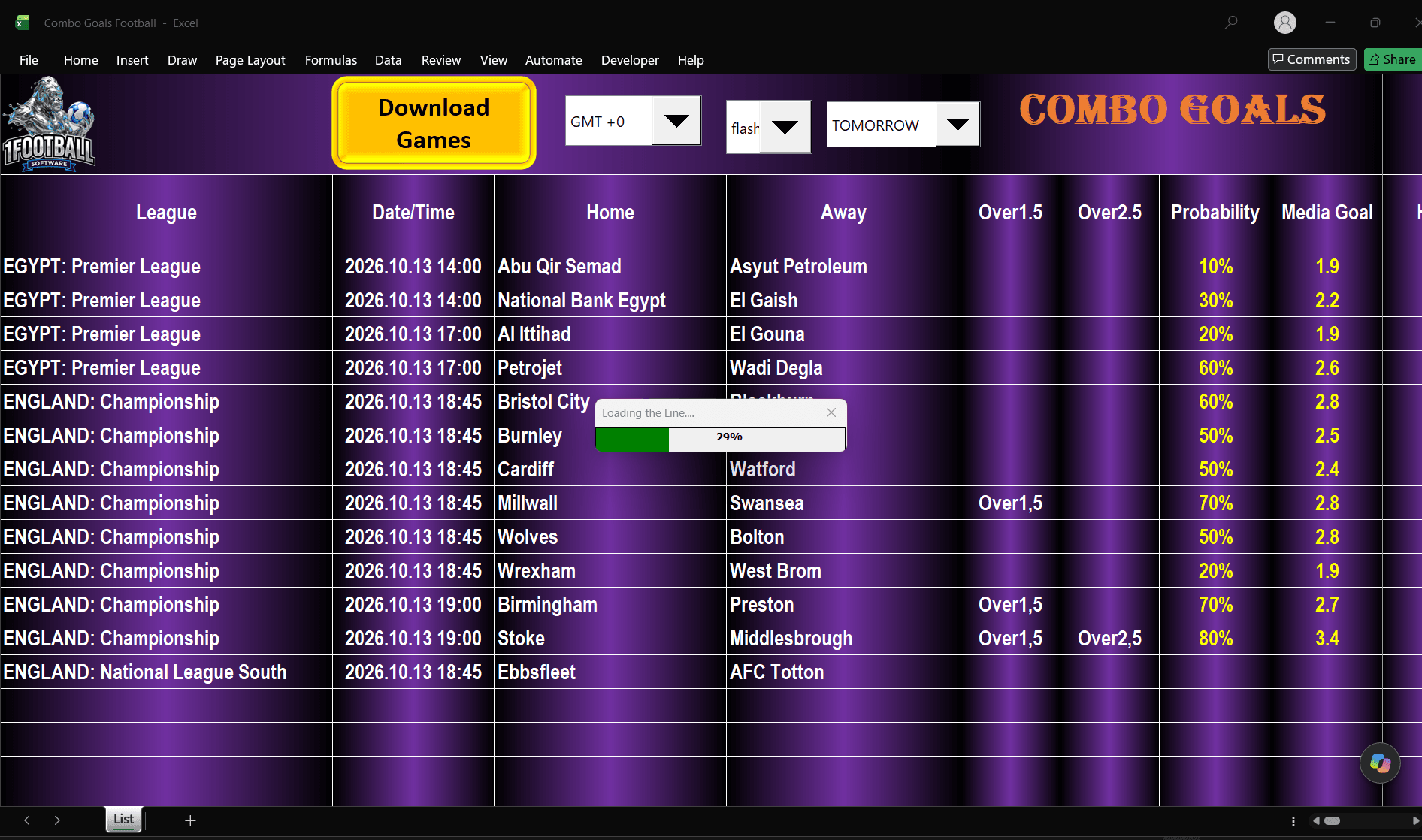
Original screenshot, unchanged. Loading is at 29%; displayed rows are work in progress, not independently verified fixtures or final predictions.
Combo Goals Football Software brings available football fixtures and goals indicators into one Excel table. You can compare Over 1.5 and Over 2.5 signals, check the figures beside each match and build a shortlist for further review.
The original screenshot below shows the workbook partway through loading a fixture list. It is useful for explaining the interface, but the progress window is still at 29%. The visible entries should therefore be treated as a snapshot of work in progress, not a finished list of recommendations.
What is Combo Goals Football Software?
The Combo Goals product page describes a tool for Windows and Microsoft Excel, with 12 months of access and fixture-list refreshes on demand. Its listed features include Over 1.5 and Over 2.5 indicators, average-goals and historical-frequency information, plus an archive sheet for reviewing past fixtures.
That makes it a goals-analysis tool. A goals threshold asks how many goals a match produces in total; it does not require an exact final score.
For example, 2–0 and 1–1 both meet Over 1.5 because each contains two goals. Neither meets Over 2.5, which requires at least three. A 2–1 score meets both thresholds.
The original Combo Goals screenshot
At the top of the screen, the Download Games button sits beside the timezone and date controls. Below it, the table shows the league, date and time, home team, away team, Over1.5, Over2.5, Probability and Media Goal columns.
This layout lets readers compare several fixtures without opening a separate screen for each one. Before interpreting the figures, however, wait for the download to finish and confirm that the intended date and timezone are selected.
How to read the columns
| Column or control | What to check |
|---|---|
| League, Home and Away | Make sure the correct competition and teams are listed. |
| Date/Time | Check the fixture date and the selected timezone. |
| Over1.5 | A displayed signal relates to a threshold of at least two total goals. |
| Over2.5 | A displayed signal relates to a threshold of at least three total goals. |
| Probability | Check which event and calculation this percentage refers to before using it. |
| Media Goal | Check the definition, sample and calculation behind the displayed figure. |
The screenshot includes a single Probability column beside two goals columns. It does not explain whether that percentage applies to one threshold, a combined rule or another calculation. A reader should not automatically assign it to both markets.
The product listing describes average-goals information, but the screenshot alone does not establish the precise formula behind “Media Goal”. A figure such as 3.4 is not an exact-score prediction, and it should not be presented as an expected-goals metric without supporting documentation.
Three visible rows, read in context
The following entries can be read in the supplied image:
| Displayed fixture | Over1.5 cell | Over2.5 cell | Probability field | Media Goal field |
|---|---|---|---|---|
| Millwall vs Swansea | Over1,5 | Blank | 70% | 2.8 |
| Birmingham vs Preston | Over1,5 | Blank | 70% | 2.7 |
| Stoke vs Middlesbrough | Over1,5 | Over2,5 | 80% | 3.4 |
Stoke–Middlesbrough has both goals signals visible, while the other two rows show only Over1.5. That is a description of the screen at the moment it was captured. Because loading is incomplete, a blank cell cannot safely be interpreted as a final “no” signal.
The 70% and 80% values are displayed software fields, not independently measured success rates. This image contains no match results and cannot show that any of these selections won. The listed fixtures and kick-off times also need checking against official schedules before use.
A practical way to use the software
Check your setup first. Review the Windows and Excel requirements and follow the instructions supplied with the purchased workbook. The product uses macros; use the original file from the official supplier and its setup guidance.
Select the intended date and timezone. This screenshot shows GMT +0. Do not assume that means the same thing as UK local time throughout the year. Verify the time setting before comparing the workbook with a club or competition schedule.
Download the games and let the process finish. The supplied image shows why this matters: some cells are populated while a loading window remains visible. Review the completed output before treating blanks or signals as final.
Compare the indicators, then check the match. Use the table to organise your research. Confirm the fixture and relevant market definition, and ask for clarification if a percentage or label is unclear.
Save the output and record the outcome. Keep the date, capture time, displayed signal and official result together. Include unsuccessful selections as well as successful ones. That gives you a more useful record than a collection of isolated winning images.
Does “Combo Goals” mean guaranteed accumulator wins?
No. The product name does not establish the chance of several selections succeeding together. Different matches can all look promising individually while a combination still fails if one required selection does not land.
Likewise, the visible Probability field does not establish a return or a proven strike rate. Evaluating performance requires a defined selection rule, complete results over a stated period and a clear explanation of what each percentage means. The free website model’s public record is separate from this paid Excel product.
Who is Combo Goals for?
Combo Goals may suit readers who want to compare goals-related information across available fixtures in a familiar spreadsheet format. The original image gives a clear view of that table-based workflow, including its date controls and loading stage.
Before choosing it, review the Combo Goals Football Software features and requirements. Pay particular attention to compatibility, access terms and the definitions of the indicators you intend to use.
By 1Football Prediction. This walkthrough uses the original supplied screenshot and the linked product information. 18+. Predictions and indicators do not guarantee results or profit.